Top WiFi Interphone Systems for Homes and Businesses?
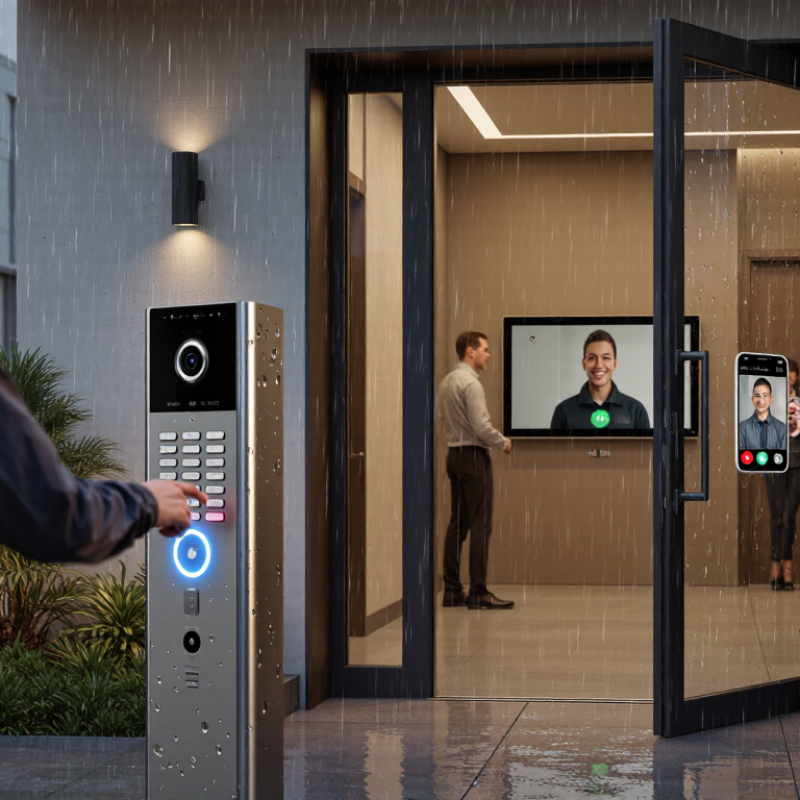
A modern entrance should do more than ring a bell. It should identify visitors clearly, protect privacy, and connect people without complicated wiring. That is where a Wifi Interphone becomes useful for homes, offices, clinics, and apartment buildings. A visitor presses the outdoor call button. The indoor screen, smartphone, or desktop device responds within seconds.
The market is moving in this direction. Grand View Research valued the global smart home market at USD 121.59 billion in 2022. Its report also forecasts a 27% compound annual growth rate from 2023 to 2030. This growth supports wider adoption of connected access systems, including video intercoms and wireless door stations. The Wi-Fi Alliance also describes Wi-Fi as essential infrastructure for connected homes and businesses. However, market growth does not guarantee a reliable installation. Walls, metal doors, crowded networks, and weak routers can reduce performance.
Small details matter.
This guide compares top Wifi Interphone systems for residential and commercial use. It considers video quality, two-way audio, network stability, mobile access, installation effort, and data protection. It also examines practical issues, such as a delivery driver waiting outside during heavy rain or an employee answering a call from another floor. These moments reveal more than a product specification. Some systems look impressive online but perform poorly at the doorway. That is an uncomfortable point, but it deserves attention. Recommendations should therefore combine manufacturer information, recognized industry research, hands-on testing, and transparent limitations. No single model fits every building. The right choice depends on coverage, users, security expectations, and long-term support.
What Is a WiFi Interphone System and How Does It Work?
A WiFi interphone system lets people at an entrance speak with someone inside using a door station and an indoor screen, phone, or tablet. The door station captures audio and, in many systems, video. It sends this information through a wireless network to a connected device. A resident can answer a visitor, check the camera view, and, if the system supports it, release the door remotely. That matters when a delivery arrives while nobody is near the entryway.
WiFi does not mean the equipment needs no wires. A door unit may still require power, and a weak signal near a metal gate or thick wall can cause delays or dropouts. Before choosing a system, check the signal where the door station will sit, not just beside the router. Also review how the system handles account access, software updates, and stored video. No setup is completely effortless.
Tips: Test the connection with the entry door closed. Ask another person to speak from outside while you answer from the usual indoor device. If voices break up, consider improving coverage or choosing a wired network connection where available.
The system’s usefulness depends on everyday details: clear sound in a noisy hallway, readable video at dusk, and alerts that arrive promptly. Remote access can be convenient, but it depends on internet service and compatible devices. It is worth checking what still works during an outage. Some product descriptions make setup sound simpler than it feels in an older home; that deserves a little skepticism.
Key Features to Compare in Home and Business Intercoms
A useful WiFi intercom should fit the building’s layout, not just look impressive on a feature list. Check whether audio remains clear through closed doors and across the rooms where people actually call. Video can help identify a visitor, but only if the camera handles dim porches and bright windows without losing detail. Small details matter. Compare two-way talk, call delay, volume controls, and whether the system can connect to phones or indoor screens. A quick test near a kitchen appliance or thick wall can reveal weak signal spots.
For a home, consider night mode, simple controls for children or older relatives, and alerts that remain useful without becoming constant noise. In a business, look for multiple zones, adjustable user permissions, and a practical way to manage calls at reception or a loading entrance. Ask how recordings are stored, who can access them, and what happens during an internet or power outage. Specification sheets can make setup sound simpler than it is. Installation needs vary, and a system that works in one building may struggle in another. Test the network at the intended mounting points before choosing.
Top WiFi Interphone System Types for Different Properties
For a detached home, a single-door WiFi interphone is often the simplest fit. It can send a visitor’s call to a phone or indoor monitor, so residents can speak before opening the door. A camera helps identify deliveries and guests, especially when the entrance is out of sight. Look for clear two-way audio and a weather-resistant door unit. Small homes differ. Check signal strength near the gate, not just beside the router.
Duplexes and small apartment buildings may need a shared entrance station with separate call buttons or directory entries. Residents should be able to answer privately from their own devices. Larger buildings often need multiple indoor stations, controlled user access, and a network plan that supports several simultaneous calls. That setup takes more coordination. Thick concrete walls and distant entryways can weaken WiFi, so test the actual route before choosing equipment.
Small offices usually benefit from a system that connects reception with one or two external doors. Staff can check a visitor’s face and speak without leaving the desk. For shops, a compact video interphone near the staff entrance can help manage deliveries during busy periods. Warehouses may require extra access points because metal shelving can interfere with signals. A practical test matters: walk the route, make a call, and listen for dropouts. Even a well-chosen system can have a weak spot.
Installation, Network Setup, and Daily Operation
A Wi-Fi interphone is only as dependable as its installation and network connection. Mount the outdoor unit near the entrance, but protect it from direct rain where possible. Check that visitors can reach the call button without stretching. Before drilling, test the signal with the door closed; walls and metal frames can weaken Wi-Fi. A strong signal beside the router may not reach the front gate.
During setup, connect the system to a secure home or business network and use a unique password. Keep the router and interphone software updated. If calls lag or video freezes, check signal strength and network congestion before moving equipment. Large buildings may need an access point placed closer to the entrance. Still, extra equipment can add setup steps, so test one change at a time. Small details matter.
Tips: Ask someone to ring the interphone while you answer from your usual phone or indoor screen. Check the audio from both sides, especially near traffic or a busy lobby. Set sensible notification hours, and review who can access the system. Daily checks take little time. Door use changes, and settings can be forgotten. A short monthly test helps catch dead batteries, loose mounts, or missed alerts before they become a nuisance.
Security, Maintenance, and Future Upgrade Considerations
A WiFi interphone is part of a home or business network, so its security depends on more than the door unit. Use unique passwords, restrict administrator access, and enable automatic updates when available. Separate visitor devices from work computers and shared storage. Verizon’s 2024 Data Breach Investigations Report found that human involvement featured in 68% of breaches studied. That figure is not specific to interphones, but it underlines why staff training and careful account management matter. A camera view is useful; it is not proof that a visitor’s identity is known.
Maintenance should be scheduled, not left until a call fails. Check speaker clarity, microphone response, door-release controls, and WiFi coverage near entrances. Keep a record of firmware updates and test the system after router changes or power interruptions. NIST’s IoT cybersecurity guidance highlights capabilities such as secure configuration, data protection, and software updates. When evaluating a replacement, confirm that it supports current network security settings and offers a practical migration path for existing wiring or access workflows. Some upgrades look simple on paper. Site conditions often disagree.
Tips: Review user accounts quarterly, remove access for former staff, and keep a spare power adapter if the system uses one. Test the backup entry procedure, too. It is easy to forget until the network drops.